

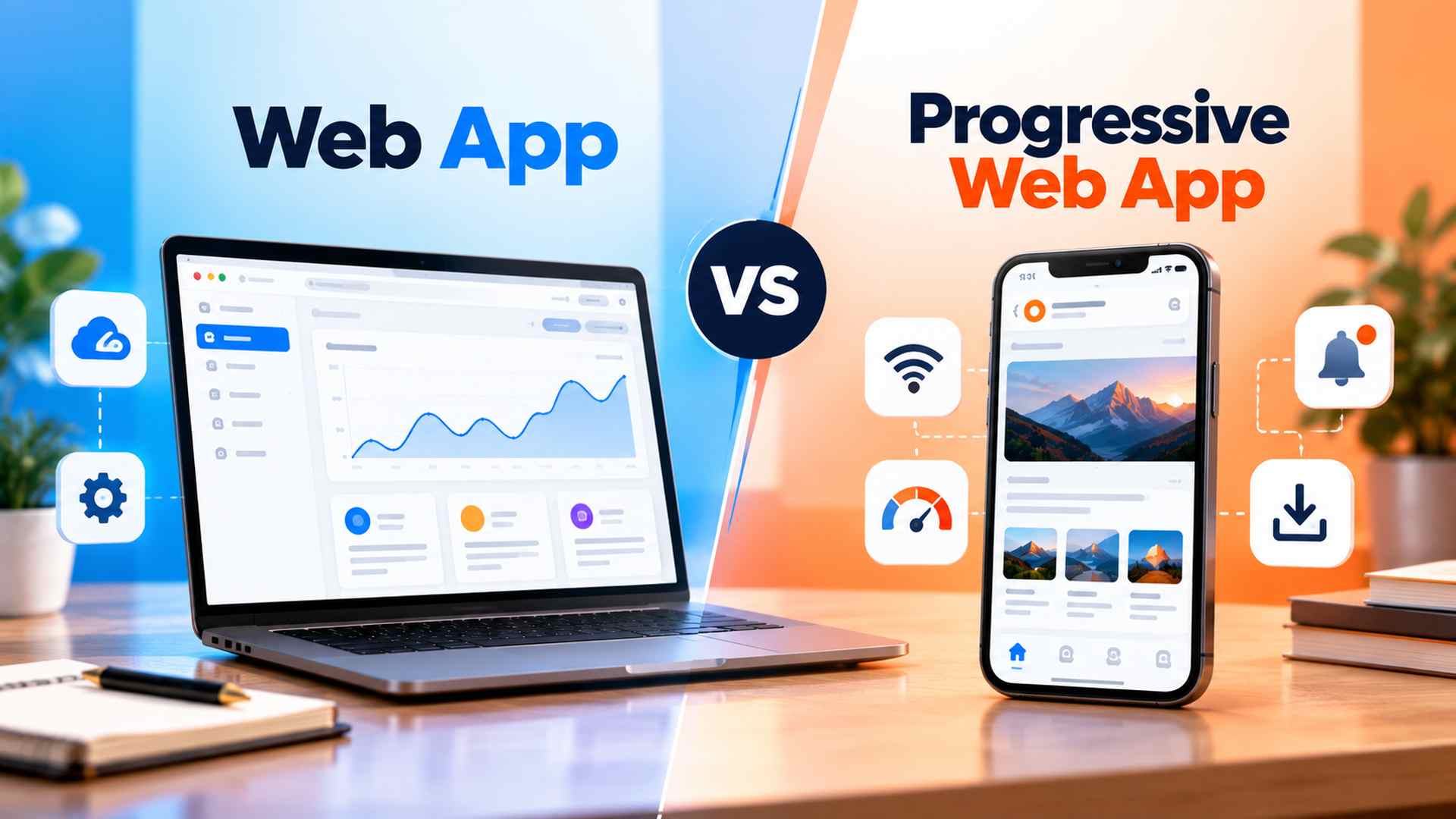
The way people access the internet has changed significantly in recent years. Mobile devices are now a major part of how users browse websites, shop online, manage work, and interact with digital services. Because of this shift, businesses need online experiences that are fast, responsive, reliable, and convenient across different devices.
Choosing the right technology plays an important role in delivering that experience. Traditional web applications have supported online businesses and digital tools for years, while progressive web apps have introduced additional capabilities that make web-based experiences feel more like native mobile applications.
Understanding Web App vs Progressive Web App can help businesses decide which approach better fits their users, budget, functionality, and long-term goals.
In this guide, we will explore how web apps and progressive web apps work, where they differ, and what each option can offer. We will also compare important factors such as installation, performance, offline access, device compatibility, user experience, and business benefits.
What is a Web App?
A web app is an application that users access directly through a web browser. Unlike a traditional informational website, a web app allows users to interact with content, perform tasks, enter information, manage accounts, and use different features without installing separate software on their device.
For example, users may log in to an account, edit documents, manage projects, design graphics, send messages, or complete transactions directly from their browser.
Web apps are commonly built using front-end technologies such as HTML, CSS, and JavaScript, along with back-end technologies such as PHP, Python, Node.js, or other server-side frameworks. The server handles data and application logic, while the browser displays the interface and allows users to interact with the application.
Modern web apps can update content dynamically without requiring the entire page to reload. This creates a smoother and more responsive experience than a traditional static website.
Popular examples include Google Docs, Trello, Notion, Canva, and Quora. Users can simply open the website, sign in when required, and begin using the service without downloading an application from an app store.
One of the biggest advantages of a web app is accessibility. The same application can usually be used across desktops, laptops, tablets, and smartphones as long as the user has a compatible browser.
Web apps are also easier for businesses to maintain because updates can be deployed on the server and made available to users immediately. There is no need for users to download a new version every time changes are made.
However, traditional web apps can have some limitations. Many depend heavily on a stable internet connection, and their access to device features such as notifications, cameras, storage, or location services may be more limited depending on the browser and device.
Different Types of Web Apps
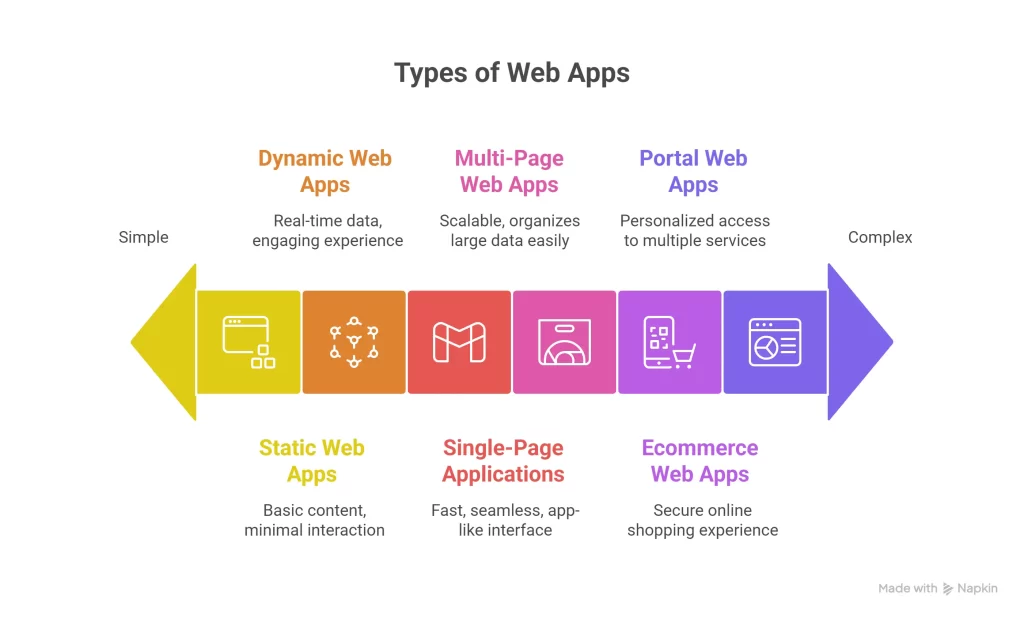
Web applications can be built in several different ways depending on the purpose of the project, required features, budget, scalability, and level of user interaction. Professional software development can help businesses plan the right architecture, workflows, integrations, and scalability for more complex applications. Some are designed mainly to display information, while others support complex workflows, real-time data, or online transactions.
Here are some of the most common types of web apps businesses use today.
1. Static Web Apps
Static web apps deliver mostly fixed content to visitors. The information normally remains the same until a developer manually updates the files.
These applications are usually built with technologies such as HTML and CSS, with JavaScript added when basic interaction is required. Because there is little server-side processing, static web apps can be lightweight and fast.
They are commonly suitable for portfolios, simple landing pages, small business websites, and informational pages where content does not need to change frequently.
The main limitation is flexibility. When regular content updates, user accounts, databases, or advanced interactions are required, a more dynamic solution is usually a better choice.
2. Dynamic Web Apps
Dynamic web apps generate and display content based on user activity, stored information, or data received from a server.
For example, a user may see different information after signing in, submitting a search, updating a profile, or interacting with other parts of the application.
Dynamic applications typically combine a database with server-side technologies such as PHP, Python, Node.js, or similar frameworks. This makes them suitable for blogs, forums, dashboards, social platforms, booking systems, and other applications where information changes regularly.
They require more development and infrastructure than static applications, but they offer significantly more flexibility and personalization.
3. Single-Page Applications (SPAs)
A single-page application loads the main application once and then updates specific parts of the interface as the user interacts with it.
Instead of refreshing the entire page after every action, the application retrieves only the information it needs. This can create a faster and smoother experience that feels closer to desktop or mobile software.
Modern SPAs are often developed using frameworks and libraries such as React, Vue, and Angular.
Applications with dashboards, project management tools, messaging interfaces, and highly interactive features often benefit from this approach.
The main advantage is a fluid user experience, although SPAs need careful development to manage performance, navigation, accessibility, and search visibility effectively.
4. Multi-Page Web Apps (MPAs)
Multi-page applications use separate pages for different sections of the platform. When users move from one page to another, the browser usually requests and loads a new page from the server.
This approach works particularly well for applications containing large amounts of structured content.
Ecommerce websites, news platforms, online directories, educational portals, and enterprise systems may use multi-page architecture because different sections can be managed independently.
MPAs may involve more full-page loading than SPAs, but they can be a practical choice for large applications with many categories, pages, and user journeys.
5. Ecommerce Web Apps
Ecommerce web apps are specifically designed to support online buying and selling.
They usually allow users to browse products, search or filter items, view product information, add products to a shopping cart, create accounts, complete payments, and track orders through a browser.
Well-known ecommerce platforms and marketplaces provide these types of browser-based experiences.
For an ecommerce application, areas such as performance, security, payment processing, product management, mobile usability, and checkout simplicity are especially important.
A poor shopping experience can cause customers to leave before completing a purchase, which makes usability and reliability critical.
6. Portal Web Apps
Portal web apps bring information, tools, and services together within a central interface.
Users normally sign in to access content that is specifically relevant to their account or role.
For example, a university portal may display courses, grades, schedules, and notices. A healthcare portal may provide appointment details and patient information, while an employee portal may contain payroll records, company resources, and internal documents.
Portal applications are particularly useful when organizations need to provide different users with controlled access to multiple services from a single location.
What is a Progressive Web App (PWA)?
A progressive web app, commonly known as a PWA, is a web-based application designed to provide a more app-like experience while still being delivered through the web.
A PWA can be opened through a browser like a traditional web app, but supported devices and browsers may also allow users to add it to their home screen or install it as an application. Depending on how it is developed and the capabilities supported by the browser, it may also provide offline functionality, notifications, and faster repeat loading.
This is one of the most important areas to understand when comparing Web App vs Progressive Web App. Both use web technologies, but PWAs include additional features designed to improve reliability, engagement, and the overall application experience.
Progressive web apps are generally developed with familiar technologies such as HTML, CSS, and JavaScript, but they also use additional components.
One of the most important is a service worker. A service worker can operate separately from the main browser page and help manage caching, network requests, and certain background functions.
PWAs can also use a web app manifest, which contains information such as the application’s name, icons, appearance, and display behavior when installed on a supported device.
How Progressive Web Apps Improve the User Experience
One of the key advantages of a PWA is its ability to provide a more reliable experience when network conditions are weak or inconsistent.
Developers can cache important resources so that previously loaded content or selected functionality remains available even when connectivity becomes limited. The exact offline experience depends on how the application is designed.
PWAs can also improve repeat visits because important application resources can be stored locally and reused rather than downloaded again every time.
Another useful capability is push notifications, where supported by the operating system and browser. Businesses can use notifications to communicate updates, reminders, order information, or other relevant messages to users who have granted permission.
Some well-known digital businesses have used progressive web technologies to provide lightweight and responsive experiences, particularly for users on mobile devices or slower connections.
Business Benefits of Progressive Web Apps
PWAs can be attractive to businesses that want an app-like digital experience without immediately developing completely separate native applications for different operating systems. Our guide to Progressive Web Apps for Business explains where this approach can make the most sense for different business needs.
A single web-based codebase can potentially serve users across a broad range of devices, which may simplify development and ongoing maintenance.
Businesses can also distribute a PWA directly through the web. Users can access the application from a URL without being required to find and download it from an app marketplace first.
Other potential advantages include:
- Faster repeat visits through caching
- Installation on supported devices
- Improved usability on mobile
- Offline or limited-connectivity functionality
- Push notification support where available
- One web-based application for multiple device types
- Easier deployment of updates
- Reduced dependence on app-store distribution
These capabilities make PWAs worth considering for ecommerce businesses, SaaS platforms, startups, service providers, and other organizations that want to create a more convenient mobile experience.
However, a PWA is not automatically the right solution for every project. Requirements such as hardware access, operating-system integration, application complexity, target audience, and business goals should all be considered before choosing the technology.
Web App vs Progressive Web App: Key Differences
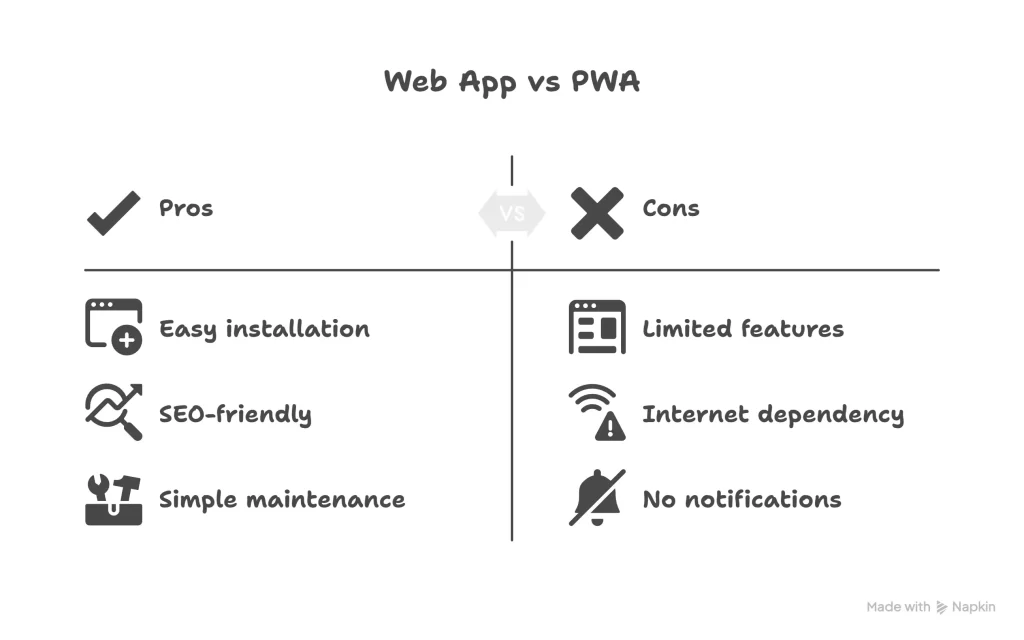
The difference between the two becomes especially important when businesses consider user experience, performance, accessibility, and engagement.
A standard web app can be a practical choice when users only need to access core features through a browser. It works well for dashboards, internal tools, portals, and services where installation or offline access is not essential.
However, when comparing Web App vs Progressive Web App, a PWA offers additional capabilities that can create a more app-like experience. Users may be able to install it on supported devices, access certain features with limited connectivity, receive notifications, and enjoy faster repeat visits through intelligent caching.
For businesses that want to improve mobile engagement without immediately developing separate native applications for iOS and Android, a PWA can be a practical option. Businesses that need deeper device integration or fully native functionality may instead consider professional mobile app development.
The right choice ultimately depends on your users, required features, budget, and long-term product strategy.
What Are the Key Benefits of Developing a Progressive Web App?
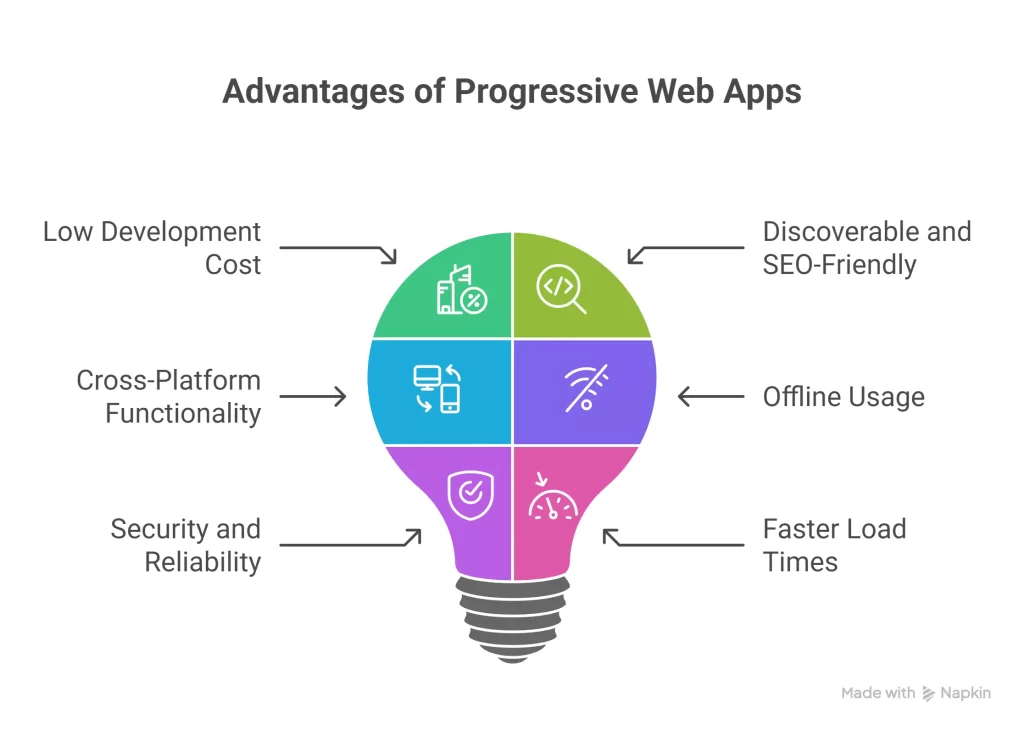
Progressive web apps have gained attention because they address several common challenges businesses face with traditional web and mobile experiences. They combine the accessibility of a website with selected capabilities normally associated with installed applications.
From easier maintenance to improved mobile usability, PWAs can provide practical advantages when the technology matches the needs of the project.
1. Lower Development and Maintenance Costs
One major advantage of a PWA is that businesses do not necessarily need to maintain completely separate applications for web, Android, and iOS users.
A well-developed PWA can serve users across multiple supported devices from a shared web-based codebase. This can reduce development complexity and make ongoing maintenance easier.
Updates can also be deployed through the web, allowing users to access the latest version without manually downloading every update from an app marketplace.
However, the actual cost depends on the complexity of the application, required integrations, design, backend infrastructure, and device-specific functionality.
2. Discoverable Through Search Engines
Unlike applications that are available only through app stores, PWA content can be accessible through normal web URLs.
When pages are crawlable, indexable, technically optimized, and provide useful content, search engines can discover them in much the same way they discover other web pages.
This gives businesses an opportunity to combine application functionality with an organic search strategy.
When evaluating Web App vs Progressive Web App, this shared web foundation is important because businesses can provide an enhanced application experience without completely separating it from their web presence.
3. Cross-Platform Accessibility
PWAs are designed to work across supported browsers and devices, including smartphones, tablets, laptops, and desktop computers.
Instead of developing a completely different interface for each platform, businesses can create a responsive experience that adapts to different screen sizes.
This can help maintain a more consistent experience while reducing the amount of platform-specific development required.
Browser and operating-system capabilities can still vary, so important PWA features should always be tested across the devices used by your target audience.
4. Offline and Limited-Connectivity Support
One of the most useful capabilities of a progressive web app is its ability to manage unstable network conditions.
Through service workers and caching strategies, developers can make selected resources or previously loaded information available when the internet connection becomes weak or temporarily unavailable.
This does not mean every PWA automatically works completely offline. The level of offline functionality depends on how the application is designed.
For example, an ecommerce PWA might allow users to view previously loaded products or access saved information while offline, while actions that require real-time server communication may need to wait until connectivity returns.
This can be particularly valuable for audiences who frequently experience inconsistent mobile networks.
5. Secure and Reliable Delivery
PWAs are normally delivered through HTTPS, which helps protect information exchanged between the browser and server.
Secure delivery is also necessary for many modern browser capabilities used by progressive web applications.
Security still requires more than HTTPS alone. Authentication, authorization, secure coding practices, data protection, infrastructure security, software updates, and regular testing all remain important.
When properly developed, a PWA can provide users with a stable and trustworthy application experience across different network conditions.
6. Faster Repeat Experiences
Progressive web apps can cache selected application files and resources on the user’s device.
This means the browser may not need to download every resource again during future visits. As a result, repeat experiences can feel noticeably faster.
Performance improvements can help users move through products, content, dashboards, or other application features with less waiting.
A faster experience can also reduce frustration and support stronger engagement, particularly for mobile users.
How Can Progressive Web Apps Improve the Ecommerce Shopping Experience?
Speed and convenience can have a major influence on ecommerce performance.
Customers expect online stores to load quickly, work smoothly on mobile devices, and make it easy to move from product discovery to checkout. Complicated registration, slow product pages, and frustrating payment processes can interrupt that journey.
A progressive web app can help ecommerce businesses improve several parts of the shopping experience.
Easier Account Access
PWAs can support streamlined account registration and authentication methods depending on the technology used by the store.
For example, businesses may provide options such as signing in with supported third-party accounts alongside traditional email-based login.
Reducing unnecessary steps during registration can make it easier for returning and first-time customers to access their accounts.
However, authentication should always be implemented with appropriate security and privacy controls.
Push Notifications
On supported browsers and operating systems, PWAs can use push notifications after receiving permission from the user.
Ecommerce businesses may use notifications for relevant updates such as:
- Order status changes
- Price reductions
- Back-in-stock alerts
- New product releases
- Promotional campaigns
- Shopping reminders
Notifications can provide a direct way to reconnect with customers, but they should be used carefully.
Sending too many irrelevant messages can lead users to disable notifications altogether. The most effective approach is to send timely information that provides clear value.
Streamlined Checkout and Payments
Checkout should require as little unnecessary effort as possible.
PWAs can work with modern web technologies and payment integrations to simplify parts of the checkout process. Depending on the browser, payment provider, and implementation, customers may be able to use saved payment or address information to complete purchases more efficiently.
Businesses should also optimize form fields, guest checkout options, error messages, mobile keyboards, and page performance.
A PWA cannot fix a poorly designed checkout by itself, but it can support a smoother experience when combined with good UX and secure payment architecture.
Shopping During Weak Connectivity
Caching can help users continue interacting with selected parts of an ecommerce application when their connection becomes unreliable.
For example, previously viewed products, images, categories, or saved information may remain accessible depending on the caching strategy.
Developers can also design certain actions to be completed or synchronized when a connection becomes available again.
This can create a more resilient shopping experience for users who frequently move between strong and weak networks.
Better Behavioral Analytics
Businesses can connect a PWA with web analytics and product analytics platforms to understand how customers interact with the application.
Depending on the tracking configuration, teams can measure metrics such as:
- Product views
- CTA interactions
- Cart additions
- Checkout progression
- Completed purchases
- User retention
- Device usage
- Conversion funnels
Some offline interactions may also be stored temporarily and sent after connectivity returns, depending on the implementation.
This data can help businesses identify friction points and make more informed decisions about design, marketing, and conversion optimization.
Overall, PWAs can make ecommerce experiences faster, more resilient, and more convenient when implemented properly. This is one reason ecommerce is often an important use case in the Web App vs Progressive Web App discussion.
Case Studies: How Businesses Have Used Progressive Web Apps
Several well-known companies have experimented with or adopted progressive web technologies to improve mobile performance and reduce friction for users.
These examples help demonstrate why businesses began paying closer attention to PWAs.
AliExpress
AliExpress introduced a progressive web experience to improve mobile web shopping for visitors who did not necessarily want to install a native application.
Published case studies reported improvements in areas such as new-user conversion and iOS conversion after the new experience was introduced.
The important lesson is not simply the percentage increase. AliExpress demonstrated how improving mobile performance and creating a more application-like web experience could reduce friction between product discovery and purchase.
Debenhams
British retailer Debenhams also used progressive web technology as part of its effort to improve mobile shopping.
Its mobile experience focused heavily on speed, smoother navigation, and reducing unnecessary steps during the customer journey.
Published case studies associated the project with improvements in mobile conversion and revenue performance, showing how technical performance and ecommerce UX can work together.
Flipkart
Flipkart developed Flipkart Lite, a lightweight web experience designed to combine the reach of mobile web with some characteristics of its native application.
The project focused on faster loading, easier repeat access, and stronger engagement for customers using mobile devices.
Reported results included improvements in conversion and re-engagement, particularly among users who preferred accessing Flipkart through the web.
These case studies do not mean every business will achieve the same results. Performance depends on the audience, existing website, implementation quality, offer, UX, traffic source, and many other factors.
They do, however, show that progressive web technology can solve meaningful business problems when it is applied to the right use case.
Web App vs Progressive Web App: How Do You Decide Which One to Build?
Choosing between the two approaches should begin with your business requirements rather than the technology itself.
Consider what users need to accomplish, how frequently they will use the application, which devices they use, whether connectivity is a concern, and which browser or device capabilities are necessary.
Budget, development resources, maintenance, scalability, and future product plans should also influence the decision.
Web App vs Progressive Web App
A traditional web app may be sufficient when users primarily need browser-based functionality and features such as installation, push notifications, or offline support are not important.
A PWA becomes more relevant when the experience needs to behave more like an installed application while remaining accessible through the web.
Understanding this distinction makes the Web App vs Progressive Web App decision much easier because the choice can be based on actual user requirements instead of simply following a technology trend.
When to Choose a Web App
A standard web app can be a practical choice when your application does not require advanced PWA capabilities.
It may be suitable for:
- Internal business tools and dashboards
- Administration systems
- Customer or employee portals
- Content-driven platforms
- Simple SaaS applications
- Projects where browser access is sufficient
- Applications where offline functionality is unnecessary
A web app can also be easier to develop when the project has relatively straightforward requirements.
When to Choose a Progressive Web App
A PWA may be worth considering when mobile experience, repeat usage, performance, or network reliability plays an important role in your product.
Common use cases include:
- Ecommerce stores
- Customer-facing SaaS products
- Booking platforms
- News and content applications
- Mobile-first services
- Businesses serving users with unreliable connections
- Applications where installation can improve repeat access
- Platforms that can benefit from supported push notifications
PWAs can also be attractive to startups that want to deliver an app-like experience across multiple devices without immediately maintaining separate native applications.
Neither approach is automatically better for every business.
The most appropriate choice is the one that provides the capabilities your users actually need without introducing unnecessary development complexity.
Final Thoughts
Modern users expect digital products to be fast, convenient, responsive, and reliable regardless of the device they use.
Traditional web apps continue to be an effective solution for a wide variety of products. They provide broad browser accessibility, straightforward distribution, and flexible development options.
Progressive web apps extend that foundation with capabilities such as installation, caching, offline or limited-connectivity experiences, and notifications where supported.
The final Web App vs Progressive Web App decision should therefore depend on what your product needs to accomplish.
If straightforward browser access meets your requirements, a conventional web app may be all you need. If your product depends on frequent mobile engagement and could benefit from a more app-like experience, a PWA may provide additional value.
At Okriya, we help businesses evaluate their technical requirements before choosing a development approach. Whether you need a traditional web application, progressive web app, or another custom digital solution, the right architecture should support both your users and your long-term business goals.
Frequently Asked Questions
What is the main difference between a web app and a progressive web app?
A traditional web app is primarily designed to operate through a browser. A progressive web app is also web-based but can include additional capabilities such as installation, service-worker caching, offline or limited-connectivity support, and notifications on supported platforms.
Can a progressive web app work without an internet connection?
A PWA can provide selected offline functionality if developers build an appropriate caching and offline strategy.
Previously loaded content or certain application features may remain available without a connection. Features that require fresh server data usually still need internet access.
Are PWAs better than native applications?
Neither option is universally better.
PWAs can offer easier web distribution and allow businesses to support several platforms through a shared web-based approach. Native applications generally provide deeper operating-system integration and may be more appropriate for products that depend heavily on device-specific functionality.
The choice should be based on the application’s requirements.
Are progressive web apps good for SEO?
PWAs can be discoverable through search engines because they are built on web technologies and URLs.
However, simply turning a site into a PWA does not automatically improve search rankings.
SEO still depends on factors such as crawlability, indexability, useful content, internal linking, page experience, performance, technical implementation, and how well the content satisfies search intent.
How much does it cost to build a PWA?
There is no universal PWA development price.
Cost depends on factors such as:
- Number and complexity of features
- UI and UX requirements
- Backend development
- Third-party integrations
- Authentication
- Payment functionality
- Offline capabilities
- Notifications
- Testing requirements
- Ongoing maintenance
A PWA may reduce the need for multiple separate application codebases in some projects, but its total cost should be estimated from the actual requirements.
Should a small business choose a web app or a PWA?
It depends on what customers need.
A standard web app may be enough for a business that primarily needs customers to access services or information through a browser.
A PWA may make more sense when repeat mobile engagement, installation, notification support, faster repeat experiences, or limited-connectivity functionality provides meaningful value.
Businesses should evaluate those requirements before selecting either approach.