

In the past few years, the way people use the internet has completely changed. More users are now browsing, shopping, and working through mobile devices than ever before. Businesses are under pressure to deliver faster, smoother, and more reliable online experiences. That’s why choosing the right technology matters.
Web apps have been around for years and still power many of the tools we use every day. But progressive web apps (PWAs) are taking things a step further by combining the reach of the web with the power of native apps. If you want to know how these two compare, you’re in the right place.
In this guide, we’ll break down what web apps are, what PWAs bring to the table, and how they’re different. You’ll learn about their installation process, speed, offline usage, and the benefits each can bring to your business.
What is a Web App?
A web app is a website that works like an application. You open it through a browser, just like a regular website, but it lets you interact with content in a dynamic way. Instead of just reading or scrolling, you can log in, create accounts, and use tools directly inside your browser.
Developers build web apps with a mix of front-end and back-end technologies like HTML, CSS, JavaScript, PHP, or Python. The app runs on a server, but the interface updates instantly in your browser. This is why web apps feel faster and more interactive than static websites.
Popular examples of web apps include Google Docs, Trello, Notion, Canva, and Quora. They don’t need installation. You just visit the link, sign in, and start working.
Web apps are a great option when you need a solution that is easy to update, works across all browsers, and doesn’t force users to download anything. But they rely on an internet connection, and their ability to use device features depends on the browser you’re using.
Different Types of Web Apps
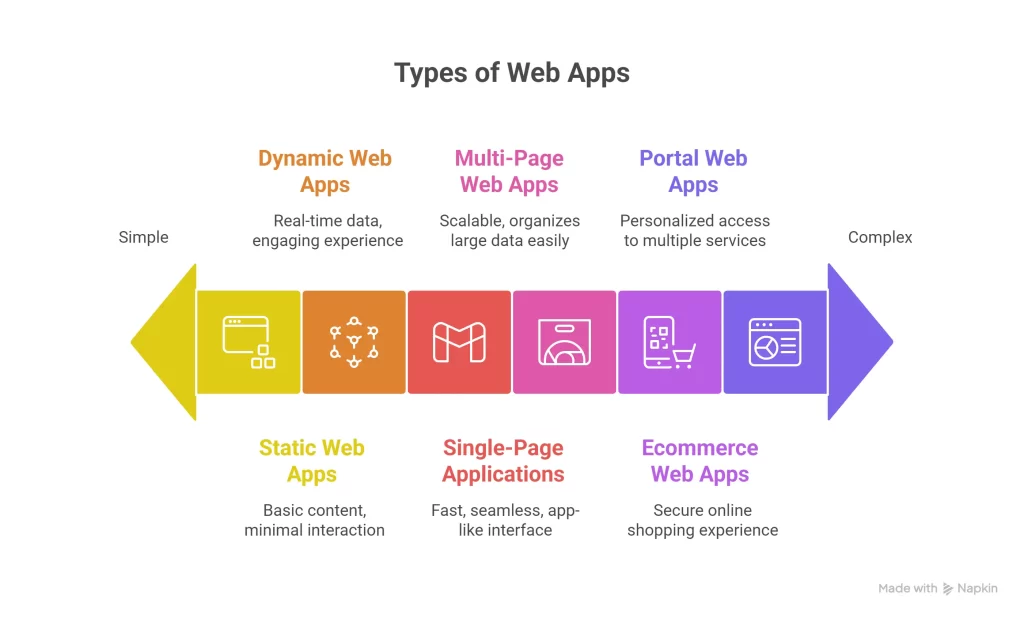
Not all web apps are the same. Businesses choose different types depending on what they want to build, how much they want to spend, and how interactive they want the app to be. Here are the most common types of web apps you’ll see today.
1. Static Web Apps
Static web apps show fixed content to every visitor. You can think of them as online brochures — fast and simple but not very interactive. They work well for portfolios, landing pages, or simple company websites. Developers usually build them with basic HTML and CSS. Updates need developer involvement because the content doesn’t change on its own.
2. Dynamic Web Apps
Dynamic web apps display content that changes based on user actions or data. Social media platforms, forums, and blogs are good examples. These apps use databases and server-side languages like PHP or Python to fetch and display real-time data. They feel more engaging but need more development work and server resources.
3. Single-Page Applications (SPAs)
SPAs load once and then update content dynamically without reloading the page. This gives users a smooth, app-like experience. Tools like Gmail, Trello, and Slack are SPAs. They use frameworks like React, Vue, or Angular to deliver a fast and seamless UI. Businesses choose SPAs when speed and user experience are top priorities.
4. Multi-Page Web Apps (MPAs)
Multi-page web apps reload every time the user navigates to a new page. Ecommerce stores or portals with many categories often use MPAs because they organize large amounts of data easily. They take longer to load compared to SPAs, but they are easier to scale when you have hundreds of pages.
5. Ecommerce Web Apps
Ecommerce web apps are built specifically for online shopping. They allow users to browse products, add items to a cart, and make payments — all within the browser. These apps focus on speed, security, and easy checkout flows. Shopify, Amazon (web version), and Daraz are examples of ecommerce web apps.
6. Portal Web Apps
Portal web apps provide a gateway for users to access multiple services or data sources from one place. Universities, hospitals, and enterprise dashboards use portals to show personalized information like grades, appointments, or reports.
What is a Progressive Web App (PWA)?
A progressive web app (PWA) is the next step in web technology. It works like a web app but feels like a native mobile app. Users can install it on their home screen, open it in full-screen mode, and even use it offline. This makes PWAs one of the best ways to deliver a fast, smooth, and reliable experience.
Google Chrome engineer Alex Russell introduced the term “progressive web app.” The goal was simple — create web apps that are faster, more secure, and more capable than traditional ones. PWAs use the same front-end tools as web apps, like HTML, CSS, and JavaScript, but they also use service workers, app manifests, and caching technology to work in low-network or offline conditions.
One of the most powerful features of PWAs is that they can send push notifications, just like native apps. They can also load content almost instantly after the first visit because they store important files in the background. This is why brands using PWAs often see higher engagement and repeat visits.
Popular examples of PWAs include Twitter Lite, Pinterest, Starbucks, Trivago, and Forbes. These companies switched to PWAs to make their apps faster and lighter, especially for users with slow internet connections or limited storage.
For businesses, PWAs mean lower development costs, better reach (no app store approvals needed), and the ability to engage users on any device. They are becoming one of the top choices for ecommerce, startups, and brands that want to improve user experience without building separate native apps for iOS and Android.
Web App vs Progressive Web App: Key Differences
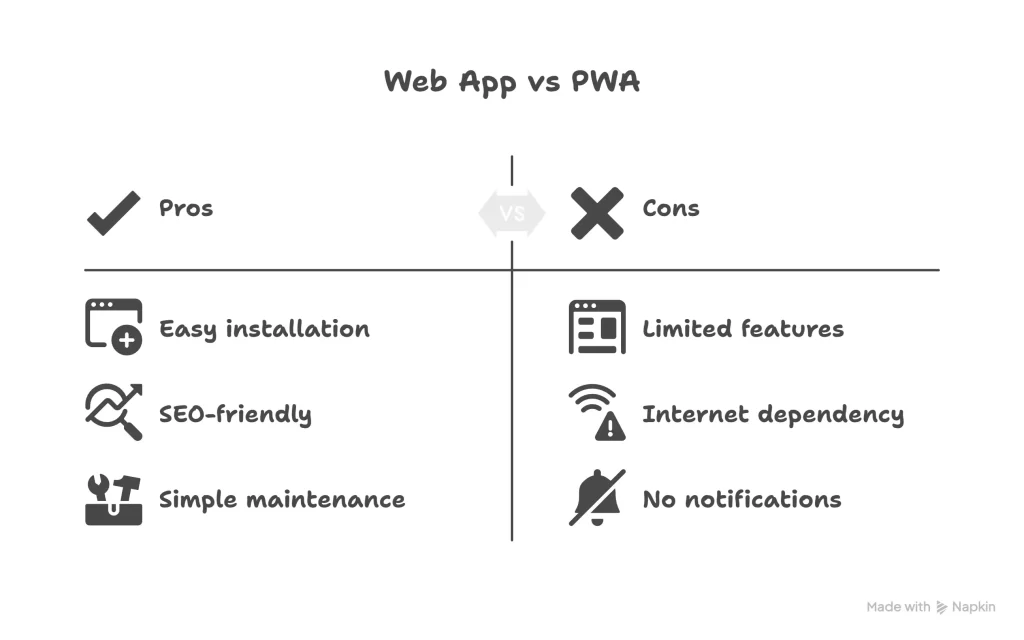
Now that you know what web apps and PWAs are, it’s time to see how they compare. Both deliver content through a browser, but PWAs add powerful features that make them feel like native apps. Here’s a clear breakdown of how they differ.
| Feature | Web App | Progressive Web App (PWA) |
| Installation | No installation needed. Users visit a URL and use the app in a browser. | Can be installed on a home screen with a single click. No app store approval required. |
| App-Like Experience | Works like a website, may not feel fully “app-like.” | Provides a native app-like interface with smooth transitions and animations. |
| Ease of Access | Accessible only through a browser. | Launchable from home screen or app drawer, just like a native app. |
| Performance & Speed | Dependent on internet speed, loads from server every time. | Loads faster after first visit due to caching, works well even on slow networks. |
| Offline Usage | Requires an internet connection to work. | Can work offline or in low-network areas by caching data locally. |
| Push Notifications & Engagement | Limited or no push notification support. | Can send push notifications to re-engage users, even when the browser is closed. |
| SEO & Discoverability | Fully indexable by search engines. | Also SEO-friendly and discoverable, but may need extra setup for app manifest. |
| Cost & Maintenance | Simple to build and maintain, ideal for smaller projects. | Slightly higher cost but saves time vs building separate iOS/Android apps. |
Why This Comparison Matters
For most businesses, the decision comes down to user experience and engagement. If your goal is just to offer basic functionality through a browser, a web app is enough. But if you want a faster, more engaging, and installable solution without building two native apps, a PWA is the smarter choice.
What Are the Key Benefits of Developing a Progressive Web App?
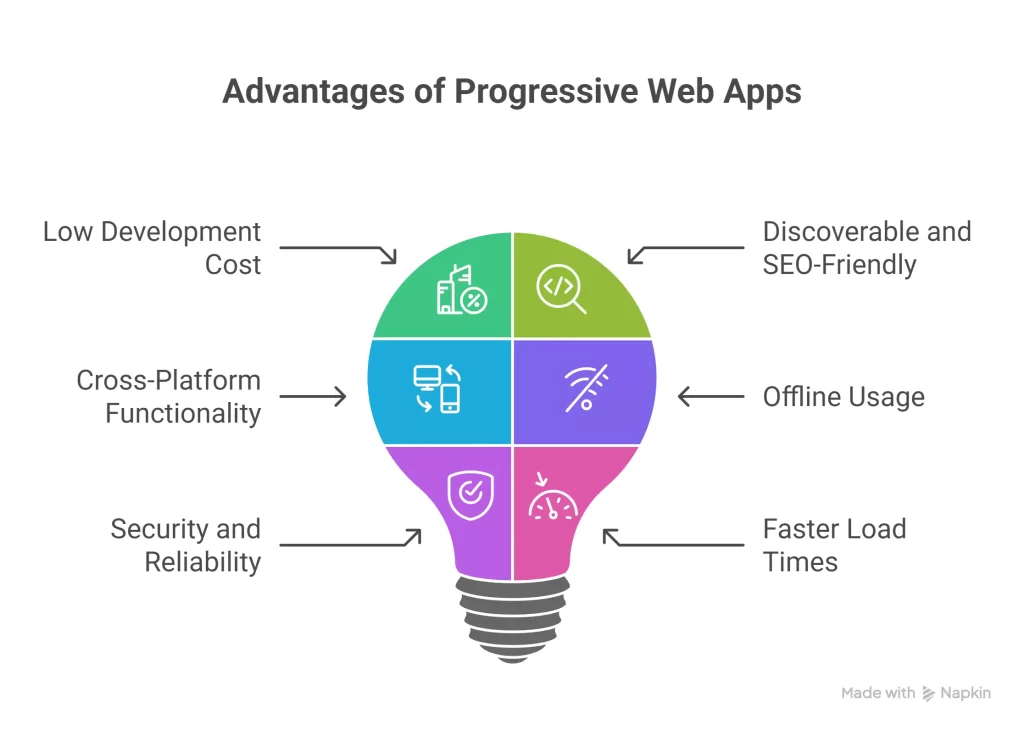
Progressive web apps are getting popular because they solve real problems for both users and businesses. They combine the best parts of websites and native apps into one powerful solution. Here are the key benefits you get when you invest in PWA development.
1. Low Development Cost
You don’t need to build separate apps for iOS, Android, and desktop. A single PWA works everywhere, which saves time and money. There is no need to pay for app store submissions, and maintenance is easier since updates go live instantly.
2. Discoverable and SEO-Friendly
PWAs can be indexed by search engines just like regular websites. This means you can optimize them for SEO and get organic traffic. Users can find your PWA through Google search and start using it right away without going through an app store.
3. Cross-Platform Functionality
PWAs work on any device with a modern browser. Whether users are on mobile, tablet, or desktop, they get the same experience. This consistency helps build trust and keeps engagement high.
4. Offline Usage
One of the biggest advantages of PWAs is their ability to work offline. Thanks to caching, users can still browse content, check saved data, or use basic features even when they lose internet connection. This is a game changer for users in areas with unstable networks.
5. Security and Reliability
PWAs are served through HTTPS, which keeps data safe and builds trust with users. They also load consistently, even on poor connections, reducing bounce rates and keeping users engaged.
6. Faster Load Times
Because PWAs store key resources locally, they load almost instantly after the first visit. Faster load times lead to better user retention and higher conversion rates.
How Can Progressive Web Apps Improve the E-Commerce Shopping Experience?
E-commerce businesses need fast and smooth user experiences to stay competitive. Slow websites or clunky checkout processes can cause users to leave before completing a purchase. Progressive web apps help solve these problems and improve the entire shopping journey.
Login via Social Accounts
PWAs allow users to sign in with social accounts like Google or Facebook. This reduces the time it takes to create an account and makes the signup process much easier. The result is higher user registrations and fewer drop-offs at the login stage.
Push Notification Alerts
Push notifications are one of the strongest engagement tools in PWAs. You can send updates about sales, discounts, abandoned carts, or new arrivals directly to users’ devices. These notifications work even when the browser is closed, which helps bring users back to the store and increases repeat visits.
Simplify Payment Processing
PWAs support web payment APIs that make checkout faster and easier. Customers can save payment details securely and complete transactions with just a few taps. This smooth experience helps reduce cart abandonment rates and improves conversions.
Shopping With No Internet
PWAs can store data locally so that users can still browse products, add items to their cart, and review previously loaded pages without an internet connection. This is a big advantage for customers in areas with slow or unstable networks. When the connection is restored, the app syncs data automatically, so no progress is lost.
Track Unique Analytics
You can integrate a PWA with Google Analytics or any other tracking tool to measure user behavior, including offline interactions. This helps businesses understand how customers use the app, where they drop off, and what changes could improve conversions.
PWAs make the online shopping experience faster, simpler, and more reliable. This is why more brands are switching to PWAs to keep users engaged and increase sales.
Case Studies: How Companies Benefited from PWAs
Many global brands have already shifted to PWAs and seen big improvements in sales, engagement, and user experience. These real-world examples show how powerful progressive web apps can be for business growth.
AliExpress: 84% Surge in iOS Conversions
AliExpress struggled to get users to install its native app. Many users preferred to shop through a browser but had a slow experience. The company launched a PWA to make the site faster and lighter. As a result, it saw 104% more new users and an 84% increase in conversions on iOS devices.
Debenhams: 40% More Mobile Revenue
British retailer Debenhams wanted to make shopping faster for mobile users. After switching to a PWA, page load times dropped significantly, and users completed purchases faster. The result was a 40% increase in mobile revenue and 20% higher overall conversions.
Flipkart: 40% Higher Re-Engagement
Flipkart launched Flipkart Lite, a PWA built to replace its mobile website. This gave users a smooth, app-like experience without forcing them to install a native app. The company reported a 70% increase in conversions and a 40% boost in user re-engagement after the switch.
These examples prove that PWAs are not just a tech trend but a business tool that drives measurable results. Companies that invest in PWAs often see better engagement, higher revenue, and improved customer satisfaction.
Web App vs PWA: How Do You Decide Which One to Build?
Choosing between a web app and a progressive web app depends on your goals, budget, and audience. Both have their place, but the right choice will save time, money, and headaches later.
When to Choose a Web App
Go for a web app if your project is simple and does not require offline use or push notifications. Web apps work well for:
- Internal tools or dashboards for your team
- Blogs, news sites, or knowledge bases
- Small projects with limited budgets
- Products where search engine visibility is the top priority
When to Choose a PWA
Choose a PWA if you want an app-like experience without the cost of building native apps. PWAs are the right fit for:
- E-commerce stores that need speed and offline access
- Startups that want to launch quickly across all devices
- Businesses targeting mobile-first users in areas with slow networks
- Brands looking to boost engagement with push notifications and home screen presence
PWAs help you stay competitive by delivering a better user experience and increasing user retention. If your business depends on repeat visits and strong conversions, a PWA is usually the smarter choice.
Final Note
The demand for faster, smoother, and more reliable web experiences is only growing. Web apps remain a solid choice for many businesses, but progressive web apps are taking the lead with their offline support, installability, and ability to engage users.
If you are planning a new project or want to upgrade your existing website, now is the best time to explore PWA development. You can reach more users, improve customer experience, and increase revenue without building separate native apps for each platform.
At Okriya, we help businesses choose the right solution and build it quickly. Whether you need a web app, a PWA, or a complete digital strategy, our team can make it happen.
Frequently Asked Questions (FAQ)
What is the main difference between a Web App and a Progressive Web App?
A web app works inside a browser and needs an internet connection, while a progressive web app can be installed on a device, works offline, and feels more like a native app.
Can a Progressive Web App work without the internet?
Yes. PWAs store data locally using caching technology, so users can browse content or complete certain actions even when offline. The app syncs automatically once the connection is restored.
Are PWAs better than native apps?
It depends on your goals. PWAs cost less to develop and work on all devices, while native apps give deeper access to device features but require separate builds for iOS and Android.
Are Progressive Web Apps good for SEO?
Yes. PWAs are indexable by search engines just like websites. With proper configuration (HTTPS, service workers, app manifest), they can rank well and bring in organic traffic.
How much does it cost to build a PWA?
The cost depends on features, complexity, and design. On average, building a PWA is cheaper than creating separate native apps for iOS and Android, because you only need one codebase to maintain.
Should small businesses build a Web App or a PWA?
Small businesses should consider a PWA if they want better engagement, offline access, and push notifications. A web app is still a good option for simple projects like blogs, landing pages, or internal tools.