

Many service-based businesses wonder if they can do local SEO without a physical location. The answer is yes. Google allows service area businesses such as plumbers, electricians, movers, and cleaners to appear in local searches when optimized correctly. Local SEO helps these businesses reach nearby customers by focusing on the cities or regions they serve instead of one street address. When done properly, it increases visibility, builds trust, and drives calls or inquiries from real clients.
This guide explains how local SEO works for service area businesses, what challenges they face, and how to optimize every element for better results. If your business travels to your customers, this article will show you how to rank where your audience is searching.
What Is a Service Area Business?
Service area businesses (SABs) deliver services directly to customers instead of working from a fixed shop or office. Examples include plumbers, electricians, cleaning crews, movers, and pest control teams. These businesses operate across multiple cities or neighborhoods, which means their local SEO strategy depends on defining clear service zones.
Google Business Profile (GBP) recognizes a service area business through verified details such as business category, service radius, phone number, and working hours. Consistent and accurate data allows Google to connect your business with nearby searches. Optimized service area settings, combined with local keywords and structured data, help your company appear in Google Maps and local search results, even without a storefront.
Can You Do Local SEO for a Service Area Business?
Yes, local SEO works perfectly for service area businesses, even without a public address. Google allows verified Google Business Profiles (GBP) to rank in local search results by focusing on the cities, regions, or postal zones they serve. The key is accuracy and consistency across every digital signal.
Local SEO for service-based companies depends on three core entities: relevance, distance, and prominence. When your service pages, business category, and reviews align with local intent, Google matches your profile to nearby searches. Defined service areas, optimized content, and active reviews help your business appear in Google Maps and the local pack.
Strong local optimization turns search visibility into calls, bookings, and real customers across every area you serve.
How does Google recognize service area businesses?
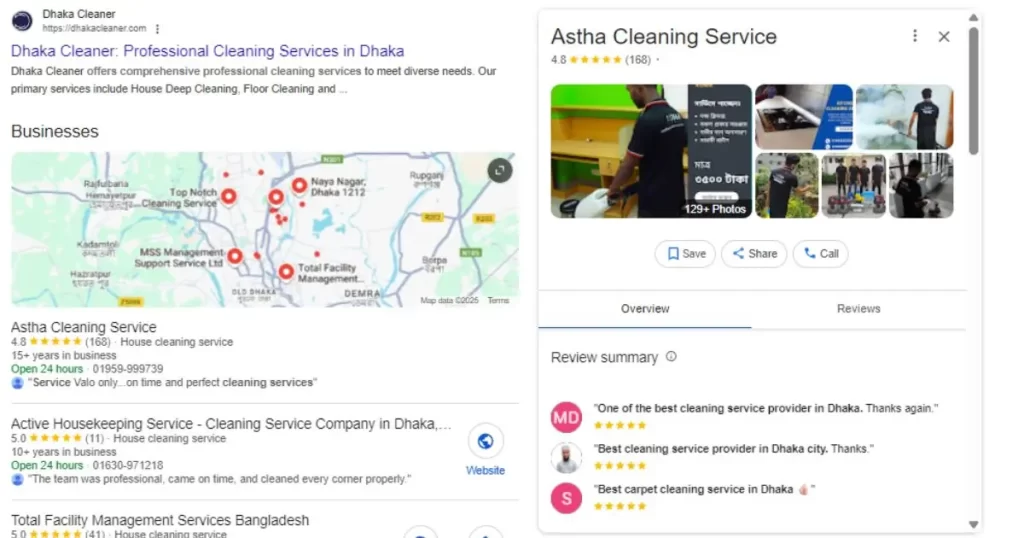
Google identifies service area businesses (SABs) by analyzing verified data within the Google Business Profile (GBP) and the connected website. Each signal tells Google where the business operates and what services it provides. The system looks for structured entities such as business category, service radius, contact number, operating hours, and listed cities.
Consistent information across your GBP, website, and local citations helps Google confirm authenticity. When the NAP details (name, address, phone) match everywhere, the business gains stronger local authority. Google also measures engagement—clicks, reviews, and direction requests—to judge reliability.
Businesses that define their service radius clearly and link their GBP to optimized city pages create precise location signals. This alignment allows Google to display the business confidently in local search results and Google Maps for relevant keywords.
Local SEO Challenges for Service Area Businesses
Service area businesses face unique barriers that limit visibility in Google’s local search results. Without a physical address, they often miss placement in the Google Maps pack, where many customers start their search. Incorrect service radius settings or inconsistent NAP information confuse Google’s location signals and weaken ranking strength.
Citations in directories like Yelp, Bing Places, or Facebook may require an address field, which leads to errors or incomplete listings. Many businesses also skip LocalBusiness Schema, preventing search engines from understanding their true service coverage. Another frequent problem is duplicate city pages that use similar text, causing keyword cannibalization and reduced relevance.
How to Optimize Local SEO for a Service Area Business
Strong local SEO optimization helps a service area business appear in nearby searches, even without a storefront. Every step below builds a signal that tells Google where your business operates and who it serves.
1. Verify and configure your Google Business Profile (GBP)
Set the correct business category, hide the physical address, and add your service areas by city or postal zone. Update hours, phone numbers, and descriptions with local keywords.
2. Create unique city pages on your website
Write focused pages such as “Cleaning Services in Dhaka” or “Pest Control in Chattogram.” Include embedded maps, NAP details, and LocalBusiness Schema. Use original text that reflects local needs and search intent.
3. Build local citations and backlinks
List your business in trusted directories like Yelp, Google Maps, and Bing Places. Keep all contact information identical. Partner with local blogs or associations for high-quality backlinks that increase domain authority.
4. Strengthen on-page SEO signals
Add city or region keywords in meta titles, headings, and alt text. Link related service pages internally to guide both users and crawlers.
Precise information, local intent, and consistent updates help Google trust your brand. The more accurately your data reflects your service area, the better your business ranks in Google’s local search and Map Pack results.
Common Mistakes to Avoid in Local SEO for Service Area Businesses
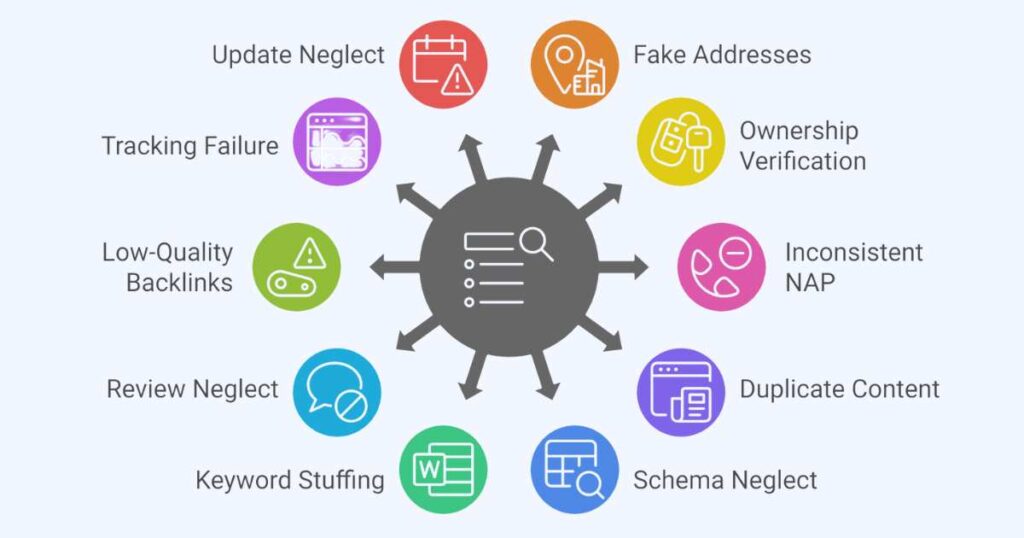
- Using fake addresses or shared office spaces on Google Business Profile.
- Forgetting to verify ownership before updating profile data.
- Leaving inconsistent NAP information across directories and social pages.
- Creating identical city pages with reused text.
- Ignoring LocalBusiness Schema and service area markup.
- Adding keywords unnaturally in titles or descriptions.
- Skipping customer reviews or failing to reply to feedback.
- Using low-quality backlinks or irrelevant directories.
- Not tracking results through Google Search Console or GA4.
- Neglecting regular updates to service zones and business hours.
FAQs
Can a service area business rank on Google Maps?
Yes, Verified Google Business Profiles with defined service zones can appear in Google Maps for searches within those areas.
Do service area businesses need a physical address?
No, Google allows hidden addresses if the business lists clear service regions and categories.
How can I show multiple cities in search results?
Create individual city pages with unique text, maps, and schema that target each service zone.
What role does NAP consistency play?
Consistent name, address, and phone details across all listings build trust and improve local rankings.
How important are customer reviews for local SEO?
Positive reviews with location keywords strengthen your profile’s authority and improve visibility in local search results.
What tools help track local SEO performance?
Use Google Search Console, Google Analytics 4, and Local Falcon to monitor keyword positions, clicks, and leads by area.
Should I use schema markup for a service area business?
Yes, LocalBusiness Schema and AreaServed markup help Google understand where your services are available.
How often should service area pages be updated?
Review and refresh city or service pages every few months to keep information accurate and competitive.
Can I add photos to my Google Business Profile if I work on-site?
Yes, Upload photos from real job sites within your service area to build authenticity and engagement.
What is the best way to improve visibility fast?
Keep your Google Business Profile active, earn genuine local reviews, and post weekly updates about your services and locations.